Wednesday, December 4, 2013

Trứng phục sinh, những hiệu ứng ẩn trong YouTube

Google đã thay đổi phương thức mà bạn chờ load một video clip trên YouTube trong khi YouTube đang load video - bạn chỉ việc nhất mũi tên lên hoặc xuống trên bàn phím trong hầu hết các video clip để giết thời gian trong lúc chờ load. Còn nếu như tốc độ internet của bạn "quá nhanh", bạn không thể thấy hiệu ứng này? Chuyện này sẽ rất đơn giản, vì YouTube có chế độ xem Video 4K, bạn sẽ thấy hiệu ứng load clip.

* Mở một video YouTube bất kỳ và gõ vào 1980. Bạn sẽ phải  bảo vệ cái video và "bắn hạ hết tên lửa trên bầu trời".


youtube defense game


Tuesday, December 3, 2013

[Chia sẻ] Bộ theme Wordpress trị giá 100$ từ Mynameshop cho mọi người !

Theme Wordpress free


Do nhu cầu theme/template wordpress của mọi người khá lớn, nhưng đa số hiện nay những theme/template này đều thu phí nên mình tổng hợp một số để chia sẻ cho anh em, mỗi theme/template này đều trị giá khoản 35$ trên mynameshop.

1. ProntPage (35$)
 - Demo: http://demo.mythemeshop.com/s/?theme=FrontPage
 - Link download: http://www.fshare.vn/file/B2D80S28KM/

2. HotNews (35$)
 - Demo: http://demo.mythemeshop.com/s/?theme=HotNews
 - Link download: http://www.fshare.vn/file/9K3OCTO2KI/

3. Nominal (35$)
- Demo: http://demo.mythemeshop.com/s/?theme=Nominal
 - Link download: http://www.fshare.vn/file/CMUWLBX9IX/

4. Fortune (35$)
- Demo: http://demo.mythemeshop.com/s/?theme=Fortune
 - Link download: http://www.fshare.vn/file/H8KIKP4CXT/
5. Pinstagram (35$)
- Demo: http://demo.mythemeshop.com/s/?theme=Pinstagram
 - Link download: http://www.fshare.vn/file/A070WKHI21/
6. Repose (35$)
- Demo: http://demo.mythemeshop.com/s/?theme=Repose
 - Link download: http://www.fshare.vn/file/FU2T0M5XCN/

Còn cập nhật...

Nguồn: thuthuatfake

Hướng dẫn chèn nút Like/khung Comment của Facebook vào blog/website/app đơn giản

Như các bạn đã biết, hiện nay có rất nhiều người sử dụng mạng xã hội như là Twitter, Facebook,.... Mọi người chia sẻ mọi thứ trên các mạng xã hội đó, họ càng có nhiều bạn bè, theo dõi thì những gì họ chia sẻ càng được nhiều người biết.
Vậy nên nếu bạn có Diễn Đàn, hoặc website, trong đó có rất nhiều bài viết hay, hữu ít muốn chia sẻ, tại sao bạn lại không chèn các Plugins của mạng xã hội vào Diễn Đàn hoặc website của bạn?

Dưới đây, mình sẽ hướng dẫn các bạn cách chèn các Plugins của Facebook vào site của bạn dùng iframe.

Trước tiên bạn cần có website (phải là website/blog/forum của chính các bạn)

Tiếp theo, chèn các đoạn code dưới đây vào trong phần html của site bạn, nơi mà bạn muốn chúng hiển thị:
 - Nút Like:

Monday, December 2, 2013

What is eating your Android device's battery?

Are you boring of bringing your phone charger all day? With these tip below, you can find out what waste your Android device's battery.

How to find out what eating your Android device's battery?
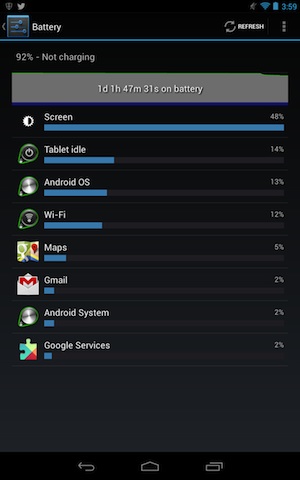
In Android, you can go to Settings -> Battery and check what is the most battery consuming application. If there has apps that you don't really need it, you should close that app.
Android setting battery consume info


1. Reduce Screen Brightness
The mostly possible is the Screen Brightness of your Android device that consumes most of your device's battery. So, reduce it by go to Settings -> Display -> Brightness and reduce it to minimum (by slide the slider to the left).
You can reduce the Screen Timeout to save battery by go to Settings -> Display -> Screen Timeout and select the minimum value.

2. Turn off Bluetooth, GPS
If you don't have any Bluetooth device connected to your Android phone, then turn off the Bluetooth by go to Settings -> Bluetooth.
The GPS is our favorite feature, we can use it to find the Direction at the strange places or Check-in in some social network such as Facebook. But this service is not necessary, especially when you want to save battery for your device, so turn off this feature by go to Settings -> Location Access.

3. Have a look at Wi-Fi
If you are in the non Wifi area, turn off the Wifi to avoid the device looking for Wifi connection that consume power of your device battery.
But note that when you are in the Wifi area, you should turn off the 3G/4G connection because the using Wifi consume less energy than Data Connection (GPRS/3G/4G).

4. Use the Battery Manager application
There are a lot of application on Google Play Store that can help you optimize your battery. In my opinion, you can use Battery Doctor (FREE). This app can help you turn on/off device features such as Wifi, Data Connection, it also help you to reduce the screen brightness...Or you can use the best choice of Techlicious is Juice Defender. This app has 3 version: FREE, Plus ($1.99) and Ultimate ($6.24).

5. Update your device software/firmware frequently
When you update your device software/firmware, it can be the Bug Fixes, or Improvements that help you device run smoothly and reduce battery consumption.

6. Uninstall unused app
Even when you don't use those app, it can be running in background. So when you don't want to use the app anymore, uninstall it as soon as possible.

7. Don't run too much app
The multitasking of Android is great, but it has a problem: background processes will consumes battery rapidly. So when you finish using an app, turn it off immediately.

Other advices is:
- Don't use animated background
- Limit using the Widget on Home Screen. Using too much Widget may cause your device running slow and draining battery.
- Turn off Vibrate if possible

If you have any suggest, feel free to comment below.
-

Saturday, November 30, 2013

How to embed Facebook Like button / Comment box on your website?

Nowadays, more and more people using social network such as Twitter, Facebook,.... They share almost everything on those social network, the more friend they have, the more views of things they shared can get.
So if you have a forums, or a website, and you have some interesting, useful article, then the reader want to share it to their friend through social network, you have to embed those social network plugin on your site.

Today, I'll show you how to embed the Facebook Plugins to your sites.

First, you must have a website (must be your own website/blog/forum)

Second, you insert the code below into your sites where your want the plugin to display:
 - Like button:

Friday, November 29, 2013

TOP 100 BEST FREE CLASSIFIED AD POSTING SITES

list od free ad posting sites
A recently updated and fresh list of top 10, top 50, and top 100+ best and free online ads posting classified ads websites around the internet world for the year 2012,mainly for the following countries- US, UK, Europe,India, Australia, China, Russia, Brazil, Germany, Canada, Italy, Japan-These are the biggest markets in the world for online free ad posting through classified sites. These free and paid ad posting websites listed here are very popular and famous among all ad posters who need to post free ads for their blogs or websites.Classifieds ads sites listed here are of high Google page rank ( PR 4-9) and high Alexa rank. And most importantly, these online ad posting free classifieds sites are listed according to their high Alexa ranking. Alexa  rankings and Google Page rankings are taken as the single most important factor while making this list of top 100 free ad posting classified websites or classified web directories. But there are some other factors as well that were kept in mind while making this list, such as-Usability,popularity,user-friendliness, and their searchability. 
In today’s time, online advertising has become very popular, beneficial and instant traffic generator for bloggers, online marketers, advertisers. Free ad posting on the popular classifieds sites has become one of the must have weapons for all types of online users who somehow need potential consumers to have a look at their showcased online products.
 
This list of top 100 free online ad posting sites is divided into segments to break the list into "top 10 free ad posting sites", "top 50 free ad posting sites" and " top 100 free ad posting sites"s. In this way you will get to know which ad posting site should be given how much priority and which one stands where.On many of these websites you can directly post free ads without any sign up or registration required, while some ask for a sign up or registration to post free ads. If you need to post free ads on daily basis, then you should open a free account on these free ad posting sites.


Wednesday, November 27, 2013

How to read emails on mail server?

First of all there are multiple protocols to retreive mail:
POP3, IMAP, etc...

I suggest you start by familiarizing yourself with the various components that make up an e-mail system.
  • Mail Transfer Agent (Protocol: SMTP)
  • Mail Delivery Agent (Protocols: POP3, IMAP)
  • Mail User Agent (Outlook, Webmail, Thunderbird, your application)
Basically what you are trying to write is a Mail User Agent. A mail user agent has to "fetch" the mails from a Mail Delivery Agent using either POP or IMAP.
This means you will have to learn about these two protocols:
POP3 RFC: http://www.faqs.org/rfcs/rfc1939.html
IMAPv4 RFC: http://james.apache.org/server/rfclist/imap4/rfc2060.txt
Since e-mail communication happens using TCP/IP you will have to learn how to use the classes in the System.Net.Sockets namespace.
Also take a look at the TcpClient class.
Try to understand these concepts first and then I suggest you start out with POP3, this protocol is quite easy. If you have problems then with very specific TcpClient code please update your question or post a new question.
Hope this sets you on the right track.

P/S: I've complete my first program that read emails in Gmail & Download the attachments in selected emails (using VB.NET 2008).

Sunday, November 17, 2013

YouTube Easter Eggs collector

No, not Metal Gear Solid's Snake. We're talking about the Snake that was popular before the smartphone was a twinkle in the industry's eye. Google has imbued YouTube videos with an engaging new easter egg that lets you play the apple-chasing game while your video stream buffers -- simply mash your keyboard's up and down arrow keys during most any clip to increase YouTube's time-wasting potential tenfold. What's that you say -- your internet connection is so ludicrously fast that videos play instantly? Ah, my lucky friend, let us introduce you to YouTube's 4K mode. Or, for a special treat, hijack the footage we've provided after the break to get your meta-giggles going.

* start playing a random YouTube video and then type 1980. You'll need to defend the video and "blow those missiles out of the sky".


youtube defense game


Friday, November 15, 2013

Apple released iOS 7.0.4

After the iOS 7.0.3 released with many improvements such as Reduce Motion, iMessage bug fixes.....Now, Apple has released iOS 7.0.4 for iPhone, iPad, and iPod touch. Apple notes that the update fix the FaceTime calls that could fail for some users. User can update over-the-air (OTA) via the Software Update section in the iOS Settings app…
apple ios 7.0.4